Running JupyterLab
JupyterLab is available on the TAAURUS desktop through the pre-installed Anaconda environment. Start it from MATE Terminal in your project directory.
Open MATE Terminal
- Log in to the TAAURUS desktop. See How to log in.
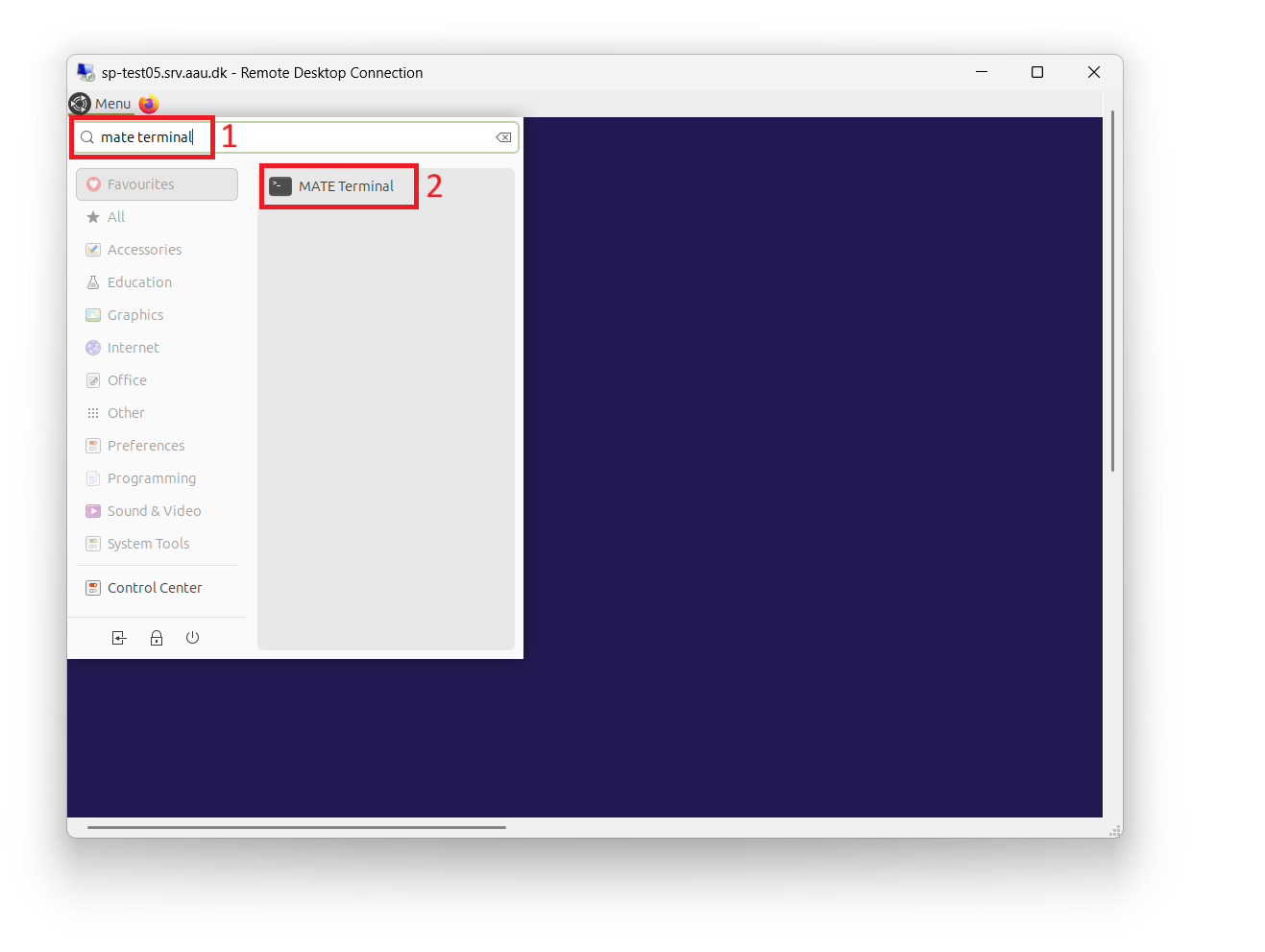
- Open the Menu in the top left corner.
- Search for MATE Terminal and click it to start a terminal.
Go to your project directory
Work in the shared project folder, not your home directory. Notebooks belong in work.
Replace <projectname> with the name of your project:
What is my project directory called?
List the projects available to you with:
See Know your directories for how data, work, and export are used.
Start JupyterLab
Activate the base Conda environment, then start JupyterLab:
JupyterLab opens in a browser on the TAAURUS desktop. If the browser does not open on its own, copy the http://localhost:8888/... link printed in the terminal and paste it into the browser.
Leave the terminal window open while you work. Closing it, or pressing Ctrl+C in that terminal, stops JupyterLab.